Everything it does, grouped by job
ZapTill is a till for the counter, tickets and a screen for the kitchen, and a back office on the web that opens on your phone. The screens below are the real app, on a made-up restaurant.
Sell
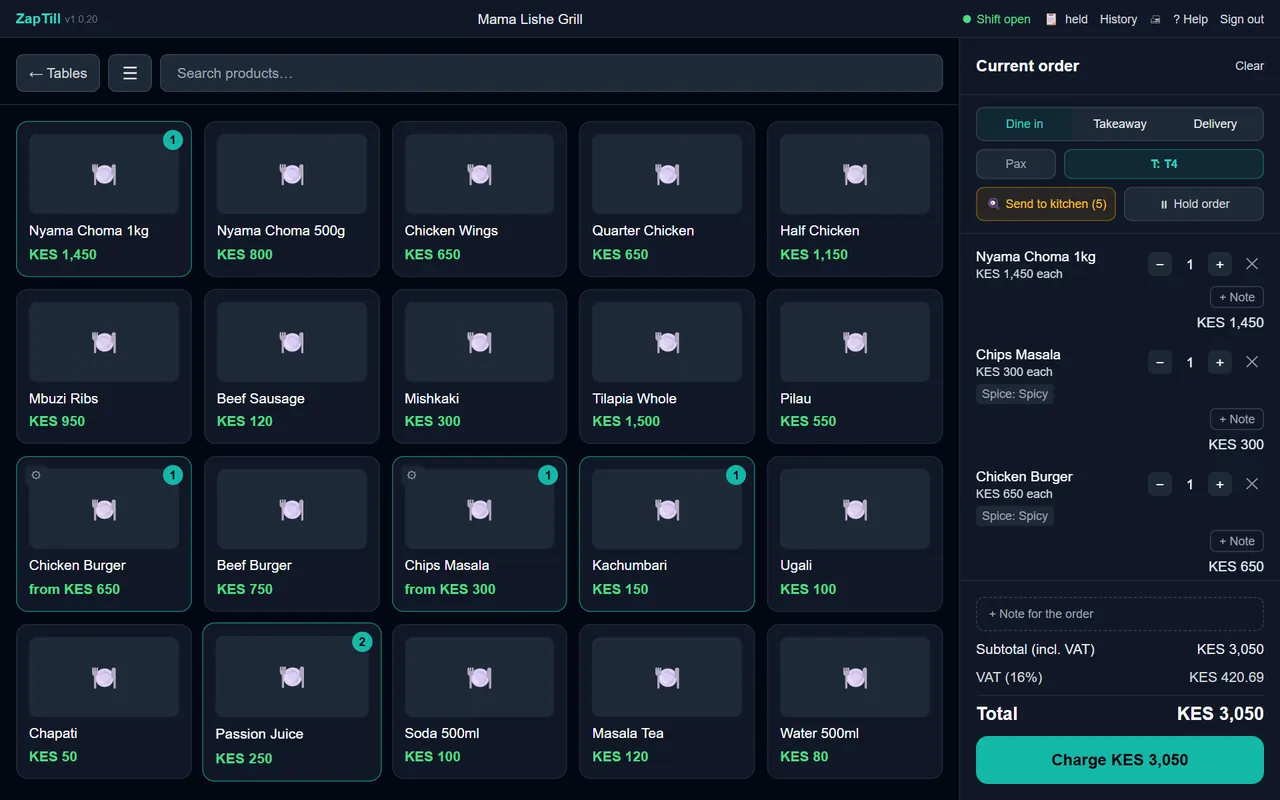
A counter till that keeps up with a queue, and doesn't stop when the internet does.
- Your items as big buttons, with your menus as big tabs across the top: Food, Drinks, Tea (in a shop, your departments)
- Scan a barcode and the item is on the bill
- Dine-in with tables, takeaway and delivery from the same screen
- Hold an order and pick it up again when the table wants more
- Split a bill between cash, M-Pesa and card
- Discounts and tips, for the staff you allow
- Notes for the kitchen, like "No onions"
- Sales on account for regulars, within the credit limit you set, confirmed by a manager
- When an item runs out, you choose: keep selling, show it as sold out, or hide it until stock comes in
- Reprint a receipt when a customer asks
Kitchen
The order reaches the right cook the moment it's taken, written the way cooks read.
- Kitchen tickets and dispatch (packing) tickets, printed as the order is sent
- Each part of the menu to its own station: grill, kitchen, bar or dispatch
- Variants on the dish's own line: "Chips Masala - Spicy"
- Extras and the cashier's notes under the dish: "+ Extra Cheese", "** No onions"
- Combos list their parts, so every piece is cooked and packed
- A kitchen display: each order as a card with a timer, Pending to Ready
- Items taken back after they reached the kitchen are recorded, with who approved it
Money and day close
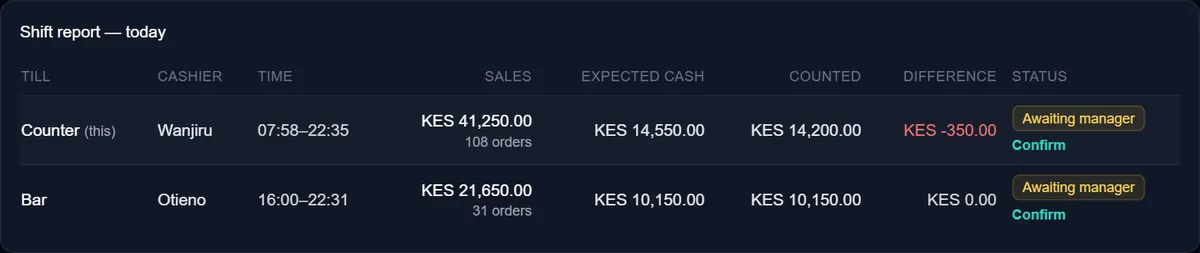
Know at every close whose drawer is short, by how much, before anyone goes home.
- An opening float counted by each cashier
- Drawer counts, with over and short for each cashier
- Each cashier's takings by payment method: cash, M-Pesa, card
- A manager confirms every shift
- The cashier's own slip shows what they declared, never what was expected
- Cash paid out and expenses from the drawer, each with who approved it
- Close the day and the branch, from the till or from the web
- Your Buy Goods or Paybill number, large on every receipt
Stock
What came in, what went out, and what went in the bin, in shillings.
- Stock levels for every product and ingredient
- Deliveries received against the supplier's note
- Transfers between branches, sent by one and received by the other
- See what your other branches hold, and ask one of them to send some
- Stock counts
- Wastage written off with a reason and its cost
- Recipes, so you know what each dish costs to make
- Supplier bills and what you still owe
- Low stock in the daily email
Stock at the till, and checking other branches from the till, come with ZapTill Online.
Receive a delivery
Mama Lishe Grill · Ngong Road · Tue 21 Oct
From Demo Supplies Ltd · note DN-2210
| Item | Received | Cost (KES) |
|---|---|---|
| Beef (choma cut) | 20 kg | 13,000 |
| Whole chicken | 30 pcs | 16,500 |
| Potatoes | 2 bag | 6,400 |
| Tilapia | 12 pcs | 7,200 |
Wastage today
| Chips (cooked) | 1.5 kg | Dropped | -420 |
| Passion juice | 2 L | Expired | -360 |
Barcodes and labels
Every item scannable, on whatever printer you have.
- Products without a barcode get one: an in-store code in your own numbering, never a code you already have
- The manufacturer's barcodes keep working as they are
- Print labels on a label printer (TSC, Xprinter, Zebra and others), any size
- Or on A4 sticker sheets from an office printer, starting at any sticker on a part-used sheet
- Or on the receipt printer
- Every label carries the barcode; the name, the price and your shop's name if you want them
- Print labels for one item, a category, or the items in a delivery
Printing labels from the till comes with ZapTill Online. When a price changes, print the label again.
- A label printer, 50 × 30 mm
- A label printer, 58 × 40 mm, with the shop’s name
- A small label, 38 × 25 mm
Drawn by ZapTill's own label code, for a demo shop.
Staff and roles
Everyone gets their own PIN, and each role sees only what it should.
- Ready-made roles, so setting up staff takes minutes
- A PIN for each person at the till; every sale and void carries their name
- A paid order can only be voided or refunded with a manager's PIN
- Your partner and your accountant sign in to the web dashboard with their own logins, never yours
- Sales and voids by cashier in the reports
- The owner sets their own password at the first sign-in
- General ManagerRuns the whole business day to day, with every permission except being the owner.
- Operations ManagerMenu and prices, offers, stock, the kitchen, shifts, the day and branch close, and staff.
- Finance ManagerEvery report, plus paying suppliers, recording expenses, customer credit and checking drawers.
- AuditorSees every report and figure a non-owner can see, and changes nothing.
- Kitchen ManagerThe menu, recipes and costs; receiving, counting and writing off stock.
- ManagerRuns a branch.
- SupervisorSells, and approves voids, refunds, sales on account and drawers with their PIN.
- CashierSells at the till.
- WaiterTakes orders, sends them to the kitchen and takes payment.
- KitchenReads the menu; the kitchen display has its own sign-in.
- StorekeeperReceives deliveries, moves stock between branches, counts it and writes it off.
- AccountantReads the books: every report, the orders and the expenses, and changes nothing.
- Fuel attendantSells fuel at the pumps (petrol stations only).
Branches and branding
Run every branch from one place, even when you're not there.
- Every branch on one web dashboard, side by side or one at a time
- Stock in every branch: who has it, and a request to send some
- A daily summary email, at the time you choose
- Close a branch's day from the web
- Your logo on the receipt
- Each branch can have its own colours on the till and its own receipt footer
- Add a branch later; it joins the same dashboard, with no second cloud fee
Day close
Mama Lishe Grill · Ngong Road · Tue 21 Oct
| Cashier | M-Pesa | Cash expected | Counted | Over / short |
|---|---|---|---|---|
| Wanjiru | 26,300 | 14,550 | 14,200 | -350 |
| Otieno | 19,850 | 13,250 | 13,250 | 0 |
| Brian | 5,950 | 4,000 | 4,050 | +50 |
Analytics
An add-on that turns your sales into a short list of what to do next, in shillings.
- "Do this next": a short, ranked list in plain words: what to order, what to have in for a busy day, old credit to chase, a dish to feature
- Your week at a glance: what to prepare each day, and the top 3 at every hour
- Stock between branches: "it sells fast at Ngong Road and slowly at Westlands: consider moving some"
- Money leaks by cashier: unusual voids or discounts come up as a warning to look into
- Menu engineering, and the items that still have no cost, so every margin is complete
- Credit ageing: who owes you, and for how long
- It never suggests raising your prices
Order about 70 more Tusker lager before Friday
You have 30 Tusker lager; a normal Friday sells about 49, and from today to the end of Friday about 91.
Order: ≈ 70 more to have 100 by Friday
Estimate: ≈ KES 18,255 of sales at risk if it runs out
Your stock level as the cloud has it now, against the average of each weekday in this period, plus 10%. KES = the units you would be short × what it sells for on average (sales at risk, not profit).
Support and updates
We set it up with you, and most problems are fixed without anyone driving to your shop.
- Setup on site: your menu loaded, printers and kitchen screens set up, your staff trained
- Updates install themselves, quietly, when the till PC starts
- Support can pull a till's log remotely to see what went wrong
- Support from 8 am to 7 pm, and 24 hours a day for priority clients
- A "what to do when" help screen on the till, which works with no internet
- Reports download to Excel whenever you want them
Works offline
When the internet goes, your tills don't.
- Tills keep selling and printing with no internet
- Staff still sign in with their PIN
- A branch server keeps every till in the shop in step
- Everything catches up by itself when the line is back; nobody types anything in again
- The till PC needs power like any computer; a small UPS keeps it going through a short cut
See the parts you need, running on your own menu.
Pictures on the till, variants, offers, stock and labels at the till come with ZapTill Online; Analytics is an add-on. See the packages