Who it's for Shops and retail
Stock that adds up. A till that never stops.
ZapTill puts a barcode on every product, keeps your stock honest from the delivery to the shelf, moves it between branches, and closes every drawer by name, with or without internet.
Receive a delivery
Mama Lishe Grill · Ngong Road · Tue 21 Oct
From Demo Supplies Ltd · note DN-2210
| Item | Received | Cost (KES) |
|---|---|---|
| Beef (choma cut) | 20 kg | 13,000 |
| Whole chicken | 30 pcs | 16,500 |
| Potatoes | 2 bag | 6,400 |
| Tilapia | 12 pcs | 7,200 |
Wastage today
| Chips (cooked) | 1.5 kg | Dropped | -420 |
| Passion juice | 2 L | Expired | -360 |
What goes wrong, and what ZapTill does about it
Half the shelf has no barcode, so the cashier types or guesses.
ZapTill gives every product without a barcode its own in-store code and prints the labels, so every item scans. The manufacturer's barcodes keep working as they are.
Stock goes missing, and nobody can say where.
Count your stock in ZapTill and see the difference against what the system expected. Damaged or expired goods are written off with a reason and their cost, not just thrown away.
The delivery was short, and you paid for the full order.
Receive each delivery against the supplier's note. Stock goes up by what actually arrived, and the supplier's bill sits next to it.
A customer asks for something you've run out of, and walks out.
Look it up at your other branches from the till, and a manager asks that branch to send some. When it is gone, you choose whether the till keeps selling it, shows it as sold out, or hides it until stock comes in.
The cash at closing never matches the sales.
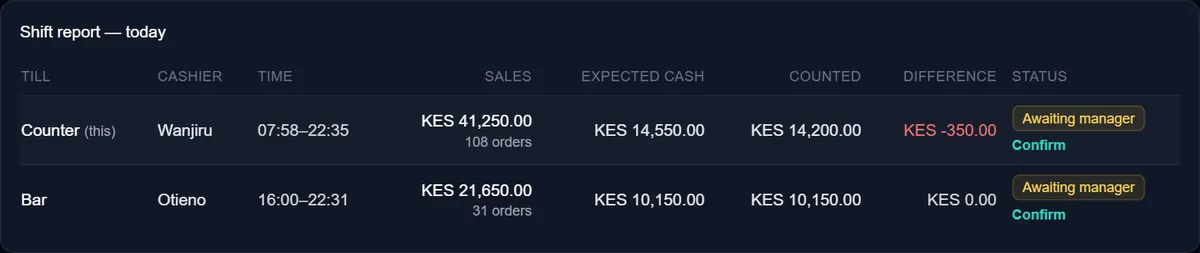
Each cashier counts their own drawer. ZapTill shows what should be there, what was counted and the difference, by name.
A barcode on every product, a label on any printer
Products that came without a barcode get one from ZapTill: an in-store code, in your own numbering, that no manufacturer uses. Codes you already have are never changed, and the scanner reads both.
Then print the labels on whatever you have: a label printer in any size, A4 sticker sheets on an office printer (start at any sticker on a part-used sheet), or the receipt printer. Every label carries the barcode, with the name and the price if you want them. When a delivery comes in, print labels for just the items in it.
Printing labels from the till comes with ZapTill Online. When a price changes, print the label again.
- A label printer, 50 × 30 mm
- A label printer, 58 × 40 mm, with the shop’s name
- A small label, 38 × 25 mm
Drawn by ZapTill's own label code, for a demo shop.
Built around how a shop sells
Departments across the top
Groceries, Beverages, Toiletries: your departments as big tabs on the till, so the cashier finds an item without scrolling. Or just scan it.
When stock runs out
You choose, once: keep selling as normal, show it as sold out so it can't be rung up, or hide it until the next delivery is in.
Your other branches' shelves
Staff who can see stock check what another branch holds, and a manager asks that branch to send some. The transfer keeps both stock levels right.
Customers on account
A trusted customer gets an account with a credit limit. The cashier puts the bill on it at the till, and the dashboard shows who owes you and for how long.
Stock at the till, checking other branches and labels from the till come with ZapTill Online. See the packages
Every drawer, counted by name
Each cashier opens with a counted float and closes with a counted drawer. The manager sees each one's expected cash, counted cash and difference, confirms it, and closes the day from the till or the web.
M-Pesa on every receipt
The receipt carries your Buy Goods or Paybill number in large print, and a split payment shows each part. This is the real receipt ZapTill prints, for a demo shop.
Questions owners ask us
Some of my products have no barcode. What then?
ZapTill makes one. It gives every product without a barcode its own in-store code, in your own numbering, and never changes a code you already have. The manufacturer's barcodes keep working as they are, and a scanner reads both at the till.
Which label printer do I need?
Any. Print labels on a label printer (TSC, Xprinter, Zebra and others, in the common sizes or your own), on A4 sticker sheets from an office printer, or on the receipt printer. Every label carries the item's barcode, and its name and price if you want them.
What happens when an item runs out?
You choose, once, for the whole business, for the items you keep stock of: keep selling as normal, show it as sold out so the cashier can't add it, or hide it from the till until stock comes in. It is back on sale by itself once the delivery is in.
A customer wants something we have run out of. Can we check the other shop?
Yes, with ZapTill Online. Staff who can see stock look up the item at your other branches from the till, and a manager asks that branch to send some. The other branch accepts it (or says why not), and the transfer keeps both stock levels right.
Can staff count stock and record deliveries at the till?
Yes, with ZapTill Online: stock levels, deliveries, transfers between branches, counts and wastage, right at the till.
How does M-Pesa work?
Your Buy Goods or Paybill number prints on every receipt. A customer can pay part M-Pesa and part cash, and the day close shows M-Pesa totals for each cashier. M-Pesa charges are Safaricom's, not ours.
What hardware do I need, and can I use my own?
For each branch:
- Two Windows computers: the branch server and the till (a POS terminal works as the till)
- A receipt printer
- A UPS, recommended, so a short power cut doesn't stop the counter
If you want them: a cash drawer, a kitchen printer or a kitchen screen, a barcode scanner, and a label printer (or use A4 sticker sheets on an office printer). If you already have hardware, we'll check it and use what fits. Anything new is quoted for your setup; an extra computer is from about KES 10,000.
Do I need internet?
Not to sell. Your tills keep selling and printing receipts with no internet, and a branch server keeps every till in the shop in step. When the internet comes back, everything catches up by itself.
You need internet to see your numbers from somewhere else, and for the daily summary to reach you.
See your own stock on ZapTill.
We set it up on site, load your menu or stock, and train your team. Start with a message.
Also: restaurants and cafés, bars and lounges, quick service and takeaways.